Turning Browsers into Buyers: 10 Best Practices for Shopify Product Pages
- Lee Bilsborough
- Read time: 8 minutes
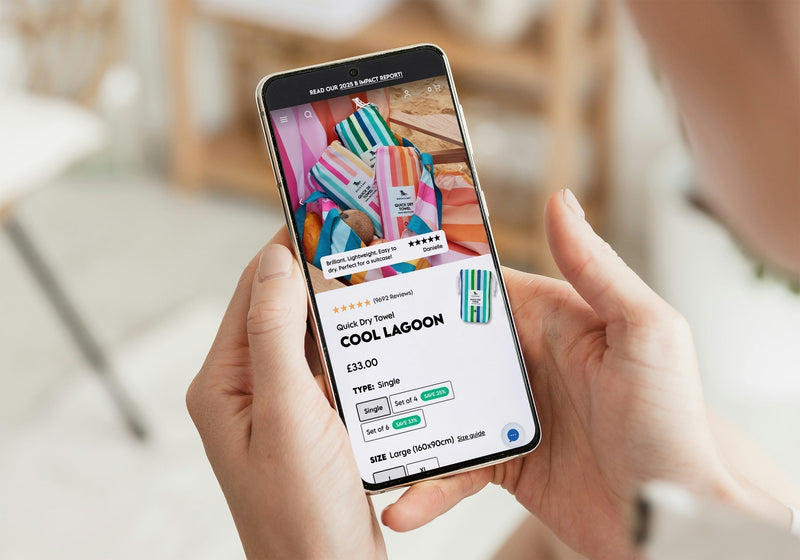
For most Shopify stores, the product page is where the conversion actually happens. You can direct traffic to your Shopify website all day long, but if your product page underperforms, your revenue will too.
We’ve worked with a wide range of eCommerce brands and consistently see the same thing: small improvements to product pages can deliver outsized gains in conversion rate, average order value, and customer trust. But what are these improvements?
In this article, we break down the top ten best practices every Shopify store should implement—and where we typically see the biggest opportunities for revenue growth.
- Lead with Strong, Conversion-Focused Imagery
- Nail the First Impression Above-the-Fold
- Make Sure to Write Benefit-Led Product Descriptions
- Build Customers Trust at Every Step
- Optimise Your Product Page Calls-to-Action (CTA)
- Reduce the Friction in your User's Buying Journey
- Use Upsells and Cross-Sells to Increase Average Order Value (AOV)
- Design Your Shopify Product Pages for Mobile First
- Prioritise Page Speed and Performance
- Continuously Test and Optimise your Shopify Product Pages
- Where Most Shopify Stores Fall Short
- How Herd Can Help
1. Lead with Strong, Conversion-Focused Imagery
Your product imagery should do more than just “look good.” It needs to effectively present what your products are and why they matter. What we often see: We frequently see eCommerce brands relying too heavily on static studio shots, which miss the chance to show a product in real use or demonstrate its true value.
What’s the opportunity?
Introducing authentic lifestyle imagery and short-form videos helps to boost page engagement. It also reduces uncertainty users may have about a product, helping to increase positive decision making.
The best practice on Shopify for product imagery
• Upload high-resolution images with zoom functionality but make sure this doesn’t affect page speed
• Present products from multiple angles and include lifestyle imagery as context matters
• Try to include videos or 360° views of products where possible
• Have consistent backgrounds and styling across your catalogue to match your brand guidelines

2. Nail the First Impression Above-the-Fold
An area that’s visible, without scrolling, determines whether a user stays on a product page or bounces off it to another website. A tip we recommend is using bullet points or badges to quickly communicate the value of a product to customers who skim read.
Must-have elements to include above-the-fold:
• Clear product titles and pricings • Strong primary image
• A prominent call-to-action (CTA) so customers can complete their purchase
• Key unique selling points or USPs such as “Free Delivery” or “30-Day Returns”
3. Make Sure to Write Benefit-Led Product Descriptions
A common mistake on many Shopify product pages is that they contain overly long, unstructured blocks of text which customers won’t read. We go by this mantra “Features tell, benefits sell!”
So instead of listing products specifications alone, the descriptions on your product pages should clearly explain:
• What problem the product solves
• Why it’s better than alternatives
• How it will fit into the customer’s life
A structure we recommend for product descriptions:
- Start with a short, punchy intro
- List the key benefits of the product in bullet form
- Provide supporting details and specifications
- Reinforce trust signals with information about guarantees and quality
4. Build Customers Trust at Every Step
Trust is one of the biggest factors that influences conversions and product purchases. A strong tactic for building trust on Shopify product pages is to display review summaries near the page CTAs, and the more detailed product reviews below-the-fold.
This avoids the pages being too top-heavy and creates a smoother page experience.
Essential product page trust signals:
• Provide Customer reviews and ratings
• Explain delivery and returns information clearly
• Include different payment options and security badges
• Present social proof such as testimonials, user-generated content and press mentions
5. Optimise Your Product Page Calls-to-Action (CTA)
Of all the elements on your product page, your “Add to Cart” button is the most important one for providing eCommerce conversions.
Certain ways you can enhance your calls-to-action is including dynamic messaging with terms like “selling fast,” and delivery estimates such as “Order in the next 2 hours for next-day delivery”. These provide extra context about the status of your products for customers.
Best practice for optimising CTAs:
• Make your calls-to-action highly visible with elements like contrasting colours. Just ensure the colours are accessibility-friendly
• Position CTAs above the fold so they’re easy to see
• Implement sticky CTAs on the mobile style of your Shopify store
• Use clear microcopy with phrases like “Add to Bag” and “Buy Now”

6. Reduce the Friction in your User's Buying Journey
Every additional step or moment of uncertainty for users on a product page, reduces conversions. We often see Shopify websites with clunky variant selectors, or unclear stock messaging, which creates hesitation and potentially lost sales.
Key areas you need to streamline:
• The selection of variants on your website such as size, colour, or design
• Ensuring how visible stock is
• Clear pricing, so make sure you don’t have any hidden costs
• Options including quick-add or express checkout for users that want products fast
7. Use Upsells and Cross-Sells to Increase Average Order Value (AOV)
A strong product page doesn’t just convert—it maximises basket value. That’s why you need to make sure that upsell opportunities on your Shopify product pages feel helpful and relevant. Don’t make them feel pushy.
Effective upsell and cross-sell strategies:
• Create and provide “frequently bought together” bundles
• Include complementary product recommendations
• Provide volume discounts or incentives

8. Design Your Shopify Product Pages for Mobile First
On most Shopify stores, 70–80%+ of the traffic comes through mobile devices. A common gap we see is that desktop-first designs don’t translate effectively onto smaller, mobile screens. So, it’s best practice to start your design with mobile users in mind, as this is where you’ll see most of your customer base coming from.
Your product page design must:
• Load quickly
• Be easy to scroll and navigate
• Keep key content like CTAs, pricing and USPs immediately visible
9. Prioritise Page Speed and Performance
Even the best-designed page won’t convert if it’s slow. Pages that load faster improve conversion rates and SEO performance, meaning your products will appear higher in search results.
The fundamental areas to focus on for optimum product page speed and performance are:
• Ensuring all images are effectively optimised
• Minimising apps and page scripts which can affect how well crawlers read a product page
• Implementing an efficient theme structure
10. Continuously Test and Optimise Your Shopify Product Pages
There’s no such thing as a “perfect” product page, so you must look to continuously improve your pages when you can. Data-driven testing, such as A/B testing, allows you to validate certain decisions for your pages.
What should you test on your product pages?
• The placement and colours of your calls-to-action
• Your product image types (lifestyle vs studio)
• Messaging and USPs
• The overall layout and structure of your pages

11. Where Most Shopify Stores Fall Short
From our experience of product pages, brands typically:
• Underutilise product imagery
• Miss clear, benefit-led messaging
• Lack strong trust signals
• Have friction in key conversion moments
What does it result in?
Missed revenue opportunities hiding in plain sight for eCommerce brands.
12. How Herd Can Help
At Herd, we specialise in turning underperforming eCommerce product pages into high-converting revenue drivers.
We combine UX expertise, deep Shopify technical knowledge (and Shopify Premier Partner status), alongside data-led optimisation strategies to deliver meaningful growth for eCommerce businesses.
The anatomy that makes up the best practice for Shopify product pages is one of the many topics covered in 2026 Shopify Growth Playbook. Containing real experiences from eCommerce businesses, our playbook deep-dives into the factors that will impact Shopify stores now and in the future.
Download our 2026 Shopify Growth Playbook and start making smarter, more confident business decisions, today.